Sidenote: LLM-Native Markdown Editor for Mac
The quickest way to lose a reader in 2026 is to send them something you didn’t read yourself.
As LLMs get better at drafting plans, reviews and emails, it feels easier and easier to copy and paste and wave the content through. It’s a slippery slope to sharing something you never actually read, don’t understand, or potentially don’t even agree with.
My approach to avoiding this slippery slope is to get a model to write output content to a local file for a proper edit and review. Hardly groundbreaking stuff! This tactic works OK, but has various small points of friction that bugged me. Firstly, reading raw markdown is a chore (no WYSIWYG editor or IDE plugin I found looked good). Secondly, every time I had a question or task I wanted to delegate back to the LLM meant copying text to and fro into the terminal.
Those annoyances led me to build Sidenote, a minimalist markdown editor for Mac that connects to a Claude Code session. Inspired by Lee Robinson’s personal software post and built over a coffee with Claude, I find it helpful enough in my day-to-day to want to share it.
Sidenote lets you comment on a line to add a question or ask for a change, and have the LLM reply in the comment thread. A pleasant side effect is that multiple comment threads can run at once, each pinned to the passage it is about. In my experience this beats a single-threaded chat session, which stacks every exchange in one column; the model has no trouble following long single threads with multiple topics, but it leaves the human scrolling up and down to find where something was discussed.
Versions of this collaborative UX are scattered across the Claude apps and elsewhere — comments on a plan file, threads on a published artifact, tracked changes in Word, etc. etc. — but none of them start from an editor I actually want to write in. That is the part I wanted: a good editor first, that happens to be a collaborative space for working with LLMs. It draws heavily on editors like Bear, which I’ve liked for years. It’s the kind of thing I’d like to see in places like Google Docs or Notion, which have in-built LLMs but where the model is much more restricted than a local Claude Code session with access to my file system, various tools, web search, etc.
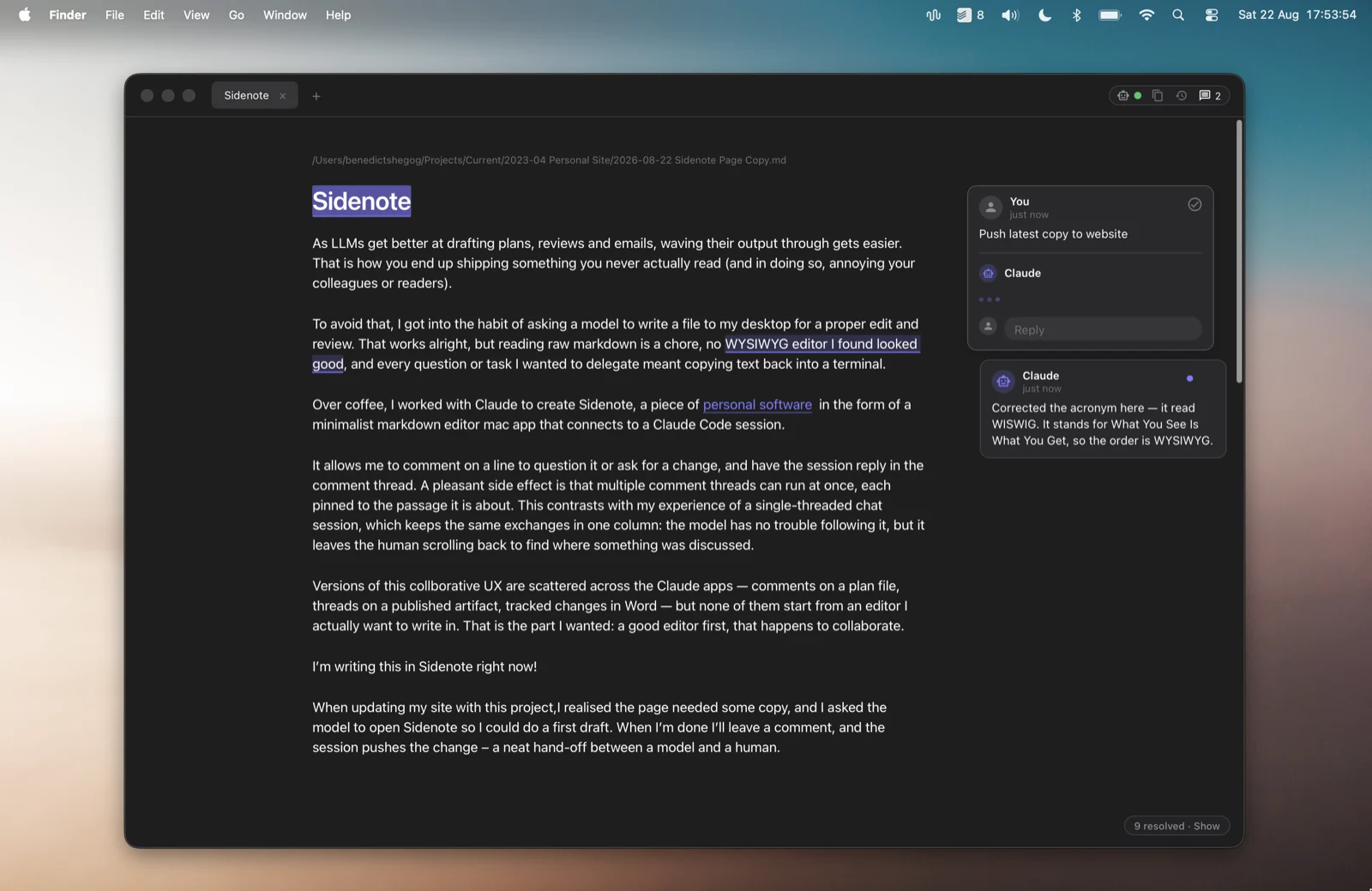
It works pretty well! I’m currently writing this copy in Sidenote.
When updating my site with this project, I realised the page needed some copy, and I asked the Claude Code session to open Sidenote so I could do a first draft. When I’m done I’ll leave a comment, and the session pushes the change – a neat hand-off between a model and a human.
In fact, because the editor experience in Sidenote is so pleasant, I’ve found myself taking on more of the original writing and going further with edits since I started using it. Claude will often decide to open a piece of output in Sidenote, when it determines I’m likely to have multiple pieces of feedback or where I’ll want to edit it.
We’re still very early days with the patterns for collaborating with these models. If we continue to see model capabilities grow and we want to stay in the loop, then we’re going to need better tools than what we have today. I think it’s going to be an interesting space to watch over the next few years.
Install
Apple silicon, macOS 13 or later.
brew install --cask benedictshegog/sidenote/sidenoteThe source is on GitHub.